![]() |
| Welcome to the exciting hobby of flight simulation |
![]() |
| Copyright (c) 2005-2013 Roger Dodger Aviation, LLC All rights reserved Items sold by Roger Dodger Aviation, LLC are governed and protected by the copyright laws of the United States of America and international intellectual property agreements |
| Start Here - Flight Simulator for Beginners by Matt Thomas When a person becomes interested in a flight simulator for his home computer, he is confronted with a wide variety of software, hardware and flight controls. All these choices can be confusing. This article provides an overall context of the choices facing the flight simulator consumer. The comments will be divided into two broad fields of interest: casual and inspired. Casual Interest If you're just curious about flight simulators in general and would like to explore the genre without spending much money, you have several options. Free or Cheap Flight Simulator Software You can download a free demo of Microsoft Flight Simulator X (FSX). This is a stripped-down version of FSX, and gives you two different aircraft and missions to try. You can try a landing approach in an airliner, or fly in an ultra-light trike. Download the FSX demo here. FlightGear is a free open-source flight sim software project written and updated by volunteers. In addition to the base software package, there are many add-on aircraft and scenery software you can install to enhance the flying experience. You can download the full version of FlightGear on this page. Google Earth includes a flight simulator component. Google has mapped the entire Earth with satellite photos, terrain data, and even the 3D likenesses of individual buildings. The flight simulator option allows you to fly over this world in a small airplane or a jet. You can even fly under the water to explore Google's underwater terrain mapping. After you finish exploring the Earth, you can also fly the Moon and Mars. Download the free Google Earth software here. X-plane provides a demo of the new X-Plane 10 for Windows, Mac or Linux. You can download the X-Plane 10 Free Demo here. X-plane also offers an inexpensive version of its flight simulator called X-plane mobile. This software is for iPad, iPhone or Andriod mobile devices. Flight Sim Controls Your first experience with flight simulator software will show how difficult it is to control an airplane with only a keyboard and mouse. You can enhance your enjoyment significantly with a simple joystick. Some joysticks can be purchased for as little as $20. Assemble a Keyboard Modification Another thing you will notice when you first start flying simulators is that many keyboard keys correspond to cockpit functions in the simulated airplane. It can be difficult to remember what each key does. Here is where you may be inspired to start your first DIY flight simulator project, a keyboard modification! You create a keyboard modification by attaching labeled cardboard buttons to the associated keyboard keys, and re-assigning those keys in the simulator software. The finished keyboard looks similar to an aircraft control panel and all the materials, including the standard USB keyboard, are inexpensive. There are several keyboard mods to choose from depending on the aircraft you fly the most. Additional Help Learning how to fly can be both exciting and overwhelming. Here are a few sources of information that can help you. We've collected the finest flight training videos from the Internet and from flight schools. Then we categorized them and listed them here: Free Flight Training Videos. Sporty's Pilot Shop is the best known source for real-world pilot supplies. They also have an excellent DVD training library. The full set of DVDs is designed for real pilots and is a little expensive, but you can request a free sample Sporty's Pilot Training DVD from this page. Angle of Attack provides a 90 day online video training course specifically designed for flight sim pilots. Sign up for it here. |
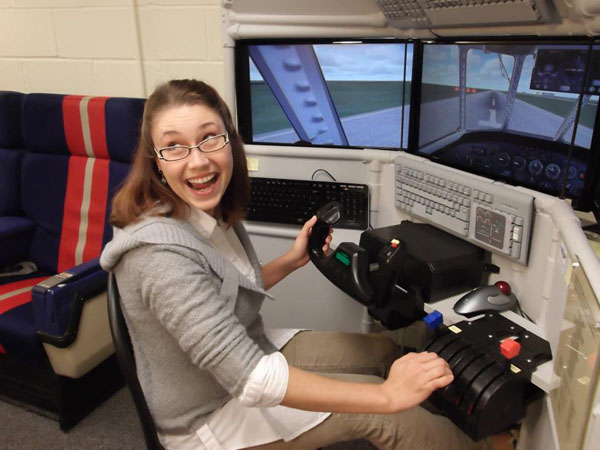
| Display A large computer monitor is a must. There's nothing bigger than the sky and if you're trying to see it all with a little 15" monitor, you're missing the big picture. Pilots do not fly by staring straight ahead. They are continously looking inside and outside the cockpit and on left and right sides of the aircraft. You can look around the virtual cockpit with keyboard keys or a hat switch, but those are clunky and unnatural. I highly recommend the TrackIR view-tracking system. It allows you to look all around the virtual cockpit by moving your head a little. At some point, you may even try a triple monitor setup for your flight simulator. The Matrox TripleHead2go makes this possible. Switch Panels We've already talked about simple keyboard modifications that make inexpensive USB keyboards look like airplane switch panels. We have keyboard mods for airliners, general aviation airplanes, jet fighters and WWII fighters. When you're ready to upgrade, GoFlight has a wide selection of high-quality switch panels to replace or augment the keyboard mods. For example, the GF-LGT II has a landing gear handle, flap switch and trim wheels that improve the flying experience dramatically. GoFlight has so much more in their product line. Check it out here. Home Cockpit After adding the controls, additional keyboards and switch panels, you're probably running out of room on your desk. Actually, you probably don't want your home cockpit to look like a desk anyway. Our DIY desktop frames elevate the monitor, provide places to mount the keyboards and panels and make the whole setup look more like an airplane cockpit. The DIY floor units hold the rudder pedals, joystick and throttle in place. All of our DIY projects can be built from readily available materials from your local home improvement store. No two home cockpits are the same. Everybody adapts their setup to what is important to them and to their available resources. |
| World War I Combat: Rise of Flight is a good choice. Helicopter Combat: DCS: Black Shark Space: Orbiter is a freeware deep space simulator available on this page. You also have Space Shuttle Mission by PMDG, or Space Shuttle Expansion for FSX by Just Flight. |
| Controls Yoke or joystick? You might make this choice dependant on the types of airplanes you fly the most. If airplanes you like to fly have yokes in real life, you will probably choose a yoke. Throttle If you choose a yoke, the throttle will most likely be a throttle quadrant that can be used in several ways: multiple engines, mixture controls, propellar pitch controls, flaps or spoilers. If you chose a joystick, the throttle will more likely be a single or split control for the left hand. Rudder pedals If you're unfamiliar with airplanes, you might not know rudder pedals are for. Rudder pedals are crucial for properly coordinating turns, making crosswind landings, steering the airplane wile on the ground and more. The pedals control the movable vertical part of the tail...kinda like a fish tail. |

| Inspired Interest With a home flight simulator you can participate in online multiplayer flying. You might choose to join a Virtual Airline and fly the same routes as real airliners. There are online flying events on the VATSIM network. Or for some real white-knuckle flying you might try online combat either alone or with an online squadron. When you are ready to take your hobby to the next level, there are a variety of things you can do to build your computer into a home flight simulator you can be proud of. Dedicated Computer Flight simulation software is very demanding on the graphics card and processing capabilities of most computers so we recommend you have a dedicated computer for your flight simulator. If you try to use the family computer for your flight sim, chances are the graphics performance will be disappointing because of all the little programs, videos, music and other stuff that slows down a computer over time. A good guide for computer specifications is here http://www.microsoft.com/games/flightsimulatorx/product_info.html Software Microsoft Flight Simulator X (FSX) is the most popular general interest aviation software on the market. Within this one program you can fly different aircraft spanning a wide spectrum of aviation: jets, helicopters, ultralights, amphibians, turboprops, and general aviation trainers. You can also download additional free aircraft and scenery from websites like avsim.com, simviaiton.com and simouthouse.com. You can purchase excellent add-on aircraft from Just Flight, Abacus, Aerosoft, Captain Sim, Carenado, Flight1, Wilco Publishing and others. X-plane is the rival to FSX. X-plane is also a general interest flight sim but it can claim that its software is more realistic than FSX because it is like a digital wind tunnel. The X-plane physics engine calculates airflow around three dimensional objects like wings. This same software can be scaled up to power high-end flight simulators for actual real-world pilot training. Even with those advanced capabilities, X-plane doesn't have the massive third-party developer community that FSX has, so there are fewer options for enhanced aircraft and scenery. X-plane also does not have the online mulitiplayer options or missions that FSX has Flight Pro Sim (or Pro Flight Simulator) is a re-branding of the free, open-source FlightGear software mentioned above. Let the buyer beware: Flight Pro Sim costs $50.00, FlightGear is free and it's the same product. There's not much the FlightGear developers can do to prevent the Flight Pro Sim people from selling a free product. More info here. You might need software to cater to a more specific interest like jet fighter combat or space. For modern jet combat, Lock On Platinum, Wings Over Israel or Falcon 4.0 Allied Force are good choices. For World War II Combat, IL-2 Sturmovik 1946 is the industry standard. Aces High is the choice for Massively Multiplayer Online combat. |

![]() |
![]() |